
The best Apple tech deals depend on what you need most: everyday computing, better audio, or an accessory that adds a new use to a device you already own. My best overall pick is the iPad 11-inch with A16, a versatile tablet with 128GB of storage, while the MacBook Air with M5 is the stronger choice for a laptop and AirPods Pro 3 suit buyers who prioritize active noise cancellation. The lineup also includes older-generation and renewed earbuds, which can make sense when their condition, compatibility, and included accessories fit your needs. The main tradeoffs are capability versus portability, newer features versus renewed condition, and paying for an accessory that works only with compatible Apple devices. Read on for the full comparison and help matching each pick to your priorities.

Get your next haul delivered free with Prime
- Fast, free delivery on millions of items
- Prime Video, Amazon Music and more included
- Member-only deals all year
Key Takeaways
- The iPad 11-inch with A16 is the most adaptable starting point in this group, but it is not a replacement for a laptop if your work depends on desktop apps or a physical keyboard.
- The MacBook Air M5 and iPad serve different jobs: the MacBook is the better fit for sustained work and a traditional computer workflow; the iPad is easier to carry and suits touch-first use.
- AirPods choices hinge on fit, noise control, and condition, not just model names: the Pro 3 is the premium noise-cancelling pick, while renewed AirPods 4 options involve a condition tradeoff.
- Apple Pencil Pro and Apple Pencil USB-C are not interchangeable upgrades; check your iPad’s compatibility and decide whether the Pro model’s added capabilities matter for your work.
- Wired EarPods remain the simplest audio option here, while renewed earbuds can offer a different balance of convenience and uncertainty around condition and included items.
| Apple iPad 11-inch (A16 Chip, 128GB, Wi-Fi, Silver) |  | Best Apple Tech Deal for Everyday iPad Users | Model: 11-inch iPad | Processor: A16 chip | Display: 11-inch Liquid Retina with True Tone | VIEW LATEST PRICE | See Our Full Breakdown |
| Apple EarPods with Lightning Connector |  | Best Simple Wired Apple Audio | Connector: Lightning | Compatibility: Devices with Lightning and iOS 10 or later; iPad models with iPadOS | Microphone: Built-in | VIEW LATEST PRICE | See Our Full Breakdown |
| Apple Watch Series 12 GPS Smartwatch, 42 mm | 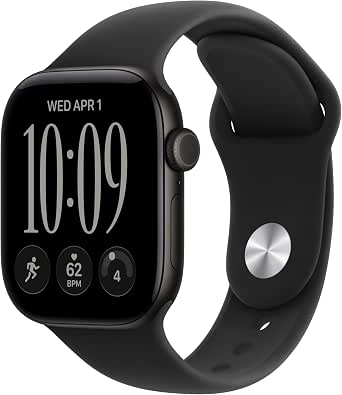 | Best Apple Tech Deal for Health Tracking | Display size: 42 mm | Connectivity: GPS, iPhone, and Wi-Fi | Battery life: Up to 24 hours of normal use | VIEW LATEST PRICE | See Our Full Breakdown |
| Apple Pencil Pro |  | Best Premium iPad Stylus | Compatibility: iPad Pro 13-inch and 11-inch (M4 and M5); iPad Air 11-inch and 13-inch (M2, M3, and M4); iPad mini (A17 Pro) | Input: Tilt and pressure sensitivity with low latency | Controls: Squeeze and barrel-roll gestures with haptic feedback | VIEW LATEST PRICE | See Our Full Breakdown |
| Apple AirPods Pro 3 Wireless Earbuds with Active Noise Cancellation |  | Best Premium Apple Earbuds | Model: MFHP4LL/A | Active Noise Cancellation: Included; up to 2x more unwanted noise removed than AirPods Pro 2 | Listening time: Up to 8 hours with ANC; up to 10 hours in Transparency using the Hearing Aid feature | VIEW LATEST PRICE | See Our Full Breakdown |
| Apple AirPods 4 with Active Noise Cancellation (Renewed) |  | Best Renewed Open-Fit Pick | Generation: 4th Gen | Model: A3056 | Noise control: Active Noise Cancellation | VIEW LATEST PRICE | See Our Full Breakdown |
| Apple AirPods 5 Wireless Earbuds with Active Noise Cancellation |  | Best for Rugged Open-Ear Listening | Model number: MKFW4LL/A | Design: Open-ear | Water and dust resistance: IP57 | VIEW LATEST PRICE | See Our Full Breakdown |
| Apple Pencil (USB-C) |  | Best Value Apple iPad Stylus | Compatibility: Selected iPad Pro, iPad Air, iPad, and iPad mini models | Connectivity and charging: USB-C | Attachment: Magnetic | VIEW LATEST PRICE | See Our Full Breakdown |
| Apple AirPods Pro (2nd Generation) with MagSafe Charging Case (USB-C) – Renewed Premium | 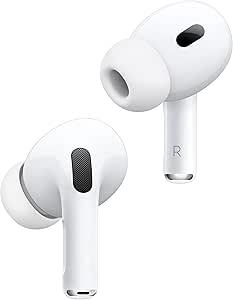 | Best Renewed Premium Isolation | Generation: 2nd Gen | Model number: MLWK3AM/A-cr | Battery life: Up to 6 hours | VIEW LATEST PRICE | See Our Full Breakdown |
| Apple AirPods 4 (Renewed) | 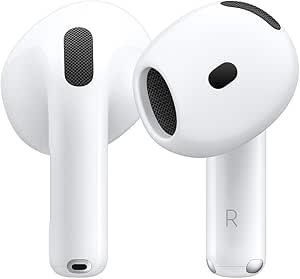 | Best for Everyday Apple Listening | Generation: 4th Gen | Connectivity: Wireless, Bluetooth 5.3 | Listening time: Up to 5 hours per charge | VIEW LATEST PRICE | See Our Full Breakdown |
| Apple MacBook Air 13.6-inch Laptop with M5 Chip, 16GB Memory, 512GB SSD, Silver | 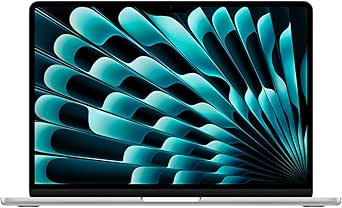 | Best Apple Laptop Deal | Chip: Apple M5 | Display: 13.6-inch Liquid Retina | Memory: 16GB unified memory | VIEW LATEST PRICE | See Our Full Breakdown |
| Apple tech deal | Weight |
|---|---|
| Apple iPad 11-inch | — |
| Apple EarPods with Lightning C | 1.37 ounces (0.04 kg) |
| Apple Watch Series 12 GPS Smar | 9.6 ounces |
| Apple Pencil Pro | 0.68 ounces |
| Apple AirPods Pro 3 Wireless E | 0.32 ounces (9.07 g) |
| Apple AirPods 4 with Active No | — |
| Apple AirPods 5 Wireless Earbu | — |
| Apple Pencil | 0.88 ounces |
| Apple AirPods Pro | — |
| Apple AirPods 4 | — |
| Apple MacBook Air 13.6-inch La | 2.71 pounds |
More Details on Our Top Picks
Apple iPad 11-inch (A16 Chip, 128GB, Wi-Fi, Silver)
The 11-inch iPad with the A16 chip is my pick for the most versatile everyday upgrade in this group: it handles browsing, streaming, video calls, and creative apps without requiring buyers to step up to an iPad Pro. Its 128GB storage gives typical app and media use more room than a bare-bones tablet, while the Liquid Retina display with True Tone adjusts its appearance for comfortable viewing across different lighting. Compared with the Apple Pencil Pro, this iPad is the more complete standalone purchase, though its Pencil and Magic Keyboard Folio compatibility means accessories add to the total. The tradeoff is that storage cannot be expanded, and those accessories are sold separately. I’d choose it for a general-purpose Apple tablet, not for someone who needs a laptop replacement with more storage built in.
Pros:- A16 chip supports responsive multitasking, gaming, and editing.
- 11-inch Liquid Retina display includes True Tone for more comfortable viewing.
- Works with Apple Pencil and Magic Keyboard Folio accessories.
- Touch ID and 12MP front and rear cameras support convenient unlocking and video calls.
Cons:- Apple Pencil and Magic Keyboard Folio are sold separately.
- The 128GB storage capacity cannot be expanded with a memory card.
- Wi-Fi model does not provide cellular connectivity.
Best for: Students and households seeking a capable iPad for schoolwork, streaming, video calls, and everyday apps.
Not ideal for: Buyers who need expandable storage, included keyboard or stylus accessories, or a higher-end iPad for demanding professional work.
- Model:11-inch iPad
- Processor:A16 chip
- Display:11-inch Liquid Retina with True Tone
- Storage:128GB
- Connectivity:Wi-Fi 6
- Cameras:12MP front with Center Stage; 12MP rear wide camera with True Tone flash
- Security:Touch ID
- Port and battery:USB-C; all-day battery life
Our verdict“Choose this iPad for a flexible everyday Apple tablet, provided 128GB and separately purchased accessories fit your needs.”
Apple EarPods with Lightning Connector
The Lightning EarPods are the straightforward pick for someone who wants calls and audio without charging another device or managing wireless pairing. Their built-in remote handles playback, volume, and calls, and the microphone works with FaceTime and Siri. That simplicity gives them a different role from the AirPods Pro 3, which add active noise cancellation, wireless listening, and health features but also bring more functions to manage. The key limitation here is compatibility: these EarPods require a device with a Lightning connector, so they are not a universal wired option for USB-C-only devices. The ear-shaped design may suit buyers who dislike in-ear tips, but fit remains personal. I’d pick them as a practical wired accessory for a compatible iPhone or iPad, not as the best choice for newer devices without Lightning.
Pros:- Wired connection requires no separate earbud charging.
- Remote controls volume, playback, and calls.
- Built-in microphone supports FaceTime and Siri.
- Ear-shaped design offers an alternative to silicone-tipped in-ear earbuds.
Cons:- Requires a compatible device with a Lightning connector.
- Wired design limits movement compared with AirPods models.
- Does not offer active noise cancellation or wireless features.
Best for: Owners of a Lightning-equipped iPhone or iPad who want simple wired audio and a built-in call remote.
Not ideal for: People using devices without a Lightning port, or listeners seeking wireless convenience and active noise cancellation.
- Connector:Lightning
- Compatibility:Devices with Lightning and iOS 10 or later; iPad models with iPadOS
- Microphone:Built-in
- Remote:Volume, playback, and call controls
- Dimensions:2.67 x 0.82 x 2.66 inches
- Weight:1.37 ounces (0.04 kg)
- Model:MWTY3AM/A
Our verdict“Choose these EarPods if you have a Lightning device and prefer uncomplicated wired listening over AirPods Pro 3 features.”
Apple Watch Series 12 GPS Smartwatch, 42 mm
The Apple Watch Series 12 GPS earns its place for buyers who want health and workout tracking alongside iPhone notifications. Heart rate, HRV, sleep, blood oxygen, menstrual cycle tracking, and readiness insights give it a broader wellness focus than an audio accessory such as AirPods Pro 3, whose workout-related tracking centers on heart rate and calories. Fall and severe car crash detection add safety functions that may matter to people who want their watch to do more than log exercise. The main compromise is its up to 24-hour battery life: regular charging is part of ownership, even with fast charging available. Some Siri and audio intelligence features are also rolling out over time. This is a better fit for iPhone owners who will use its health and safety tools than for anyone seeking a low-maintenance fitness tracker.
Pros:- Tracks heart rate, HRV, sleep, blood oxygen, menstrual cycles, and workout metrics.
- Readiness insights draw on recent activity, vitals, and sleep.
- Fall detection and severe car crash detection add safety functions.
- Fast charging can provide up to 12 hours of normal use from 15 minutes of charging.
Cons:- Up to 24 hours of normal-use battery life means frequent charging.
- Some Siri and audio intelligence features are rolling out over time.
- Several functions rely on iPhone or Wi-Fi connectivity.
Best for: iPhone owners who want detailed health and sleep metrics, workout tracking, safety alerts, and wrist-based notifications.
Not ideal for: Buyers who prefer multi-day battery life, do not use an iPhone, or want a basic tracker without a broad set of features.
- Display size:42 mm
- Connectivity:GPS, iPhone, and Wi-Fi
- Battery life:Up to 24 hours of normal use
- Fast charging:15 minutes for up to 12 hours of normal use
- Health features:Heart rate, HRV, sleep score, blood oxygen, and menstrual cycle tracking
- Safety features:Fall detection, severe car crash detection, and emergency service and contact notifications
- Model number:MJEA4LS/A
- Weight:9.6 ounces
Our verdict“Pick the Series 12 if you want an iPhone-connected watch with broad health and safety tracking and can charge it daily.”
Apple Pencil Pro
The Apple Pencil Pro is the specialist pick for artists, note-takers, and markup-heavy workflows who can use its pressure sensitivity and low-latency input. Tilt and pressure give drawing strokes more control, while squeeze, barrel roll, and haptic feedback make tool changes feel more direct than a basic stylus workflow. Magnetic attachment handles pairing and charging, and Find My support can help locate a misplaced Pencil. Compared with the Apple Pencil (USB-C) in the wider roundup, the Pro focuses on richer drawing controls rather than being a simple writing accessory. That extra capability only matters if your iPad is compatible: this model works with specified recent iPad Pro, iPad Air, and iPad mini models, not every iPad. It is sold separately, so I’d skip it for casual tapping or on an incompatible tablet.
Pros:- Tilt and pressure sensitivity support expressive, precise drawing.
- Low-latency input suits handwriting and detailed markup.
- Squeeze, barrel-roll gestures, and haptic feedback offer quick tool control.
- Magnetic attachment supports pairing and charging; Find My support can help locate it.
Cons:- Compatibility is limited to specific iPad Pro, iPad Air, and iPad mini models.
- Sold separately from the iPad.
- Advanced controls may be unnecessary for casual writing or navigation.
Best for: Digital artists, students, and professionals with a compatible recent iPad who regularly draw, annotate, or take handwritten notes.
Not ideal for: Owners of unsupported iPads, occasional stylus users, or buyers who only need basic note-taking and do not need advanced gestures.
- Compatibility:iPad Pro 13-inch and 11-inch (M4 and M5); iPad Air 11-inch and 13-inch (M2, M3, and M4); iPad mini (A17 Pro)
- Input:Tilt and pressure sensitivity with low latency
- Controls:Squeeze and barrel-roll gestures with haptic feedback
- Charging and pairing:Magnetic attachment
- Find My:Supported
- Dimensions:8.25 x 2.25 x 0.75 inches
- Weight:0.68 ounces
- Model number:MX2D3AM/A
Our verdict“Buy the Pencil Pro for regular creative or annotation work on a listed compatible iPad, rather than for basic tablet use.”
Apple AirPods Pro 3 Wireless Earbuds with Active Noise Cancellation
The AirPods Pro 3 are the feature-rich audio pick for Apple users who want noise control, workout tools, and hearing-health functions in one pair of earbuds. Active Noise Cancellation, adaptive EQ, and five ear tip sizes make them more adaptable to noisy commutes and varied listening preferences than the wired Lightning EarPods. They also add heart rate sensing for supported workouts, Live Translation, and hearing features such as Hearing Aid and Hearing Protection. That breadth comes with two catches: listening time is up to 8 hours with ANC on, and heart rate tracking, Live Translation, and some workout functions require an iPhone and Apple Intelligence. I’d choose them over simpler AirPods options when those added features matter; buyers who mainly want basic listening may not benefit enough from the extra capability.
Pros:- Active Noise Cancellation removes up to 2x more unwanted noise than AirPods Pro 2.
- Five ear tip sizes help users find a personalized fit.
- Heart rate sensing supports tracking across up to 50 workout types.
- Includes hearing test, Hearing Aid, and Hearing Protection features.
Cons:- Listening time is up to 8 hours with Active Noise Cancellation enabled.
- Heart rate tracking, Live Translation, and some workout features require an iPhone and Apple Intelligence.
- The in-ear fit and added features may be unnecessary for casual listeners.
Best for: Apple users who want active noise cancellation, a customizable in-ear fit, and supported workout and hearing-health features.
Not ideal for: Listeners who prefer wired earbuds, need longer ANC listening between charges, or lack an iPhone and Apple Intelligence for some features.
- Model:MFHP4LL/A
- Active Noise Cancellation:Included; up to 2x more unwanted noise removed than AirPods Pro 2
- Listening time:Up to 8 hours with ANC; up to 10 hours in Transparency using the Hearing Aid feature
- Ear tip sizes:Five
- Workout tracking:Heart rate and calories burned across up to 50 workout types
- Hearing features:Hearing test, Hearing Aid, and Hearing Protection
- Dimensions:1.1 x 0.8 x 1.2 inches
- Weight:0.32 ounces (9.07 g)
Our verdict“Choose AirPods Pro 3 for premium noise control and Apple-connected health features, but not if you want simple wired audio or minimal charging.”
Apple AirPods 4 with Active Noise Cancellation (Renewed)
AirPods 4 with Active Noise Cancellation suit listeners who want environmental sound controls without switching to sealed, tip-based earbuds. Their Adaptive Audio, Transparency mode, and Conversation Awareness let listening adjust to changing surroundings, while Voice Isolation can help calls come through more clearly in noisy places. Compared with the standard Apple AirPods 4 (Renewed) in this roundup, this version adds ANC but lists the same five hours of listening per charge. The tradeoff is a renewed product with a 90-day warranty, rather than a new purchase, and the water-resistance level is not specified. I’d choose it over the standard AirPods 4 when sound control matters more than avoiding renewed-product uncertainty; buyers seeking an in-ear seal should compare it with the AirPods Pro (2nd Generation).
Pros:- Active Noise Cancellation plus Adaptive Audio and Transparency mode
- Voice Isolation helps clarify calls in noisy settings
- Skin-detecting sensor pauses audio when earbuds are removed
- Bluetooth 5.3 wireless connectivity
Cons:- Renewed condition and 90-day warranty may not suit buyers seeking a new product with longer coverage
- Listed listening time is up to five hours per charge
- Water-resistance level is not specified
Best for: Apple users who prefer an open-fit earbud and want ANC and adaptive listening features at a lower-commitment renewed option.
Not ideal for: Buyers who want a new product, a clearly specified water-resistance rating, or the stronger in-ear isolation of AirPods Pro.
- Generation:4th Gen
- Model:A3056
- Noise control:Active Noise Cancellation
- Connectivity:Bluetooth 5.3, wireless
- Battery life:5 hours
- Charging case:USB-C case with speaker
- Water resistance:Water resistant; level not specified
- Warranty:90 days
Our verdict“Choose this renewed AirPods 4 model if you want an open fit with ANC and can accept limited warranty coverage and unspecified water resistance.”
Apple AirPods 5 Wireless Earbuds with Active Noise Cancellation
The AirPods 5 stand out here for pairing an open-ear design with IP57 dust, sweat, and water resistance. That combination makes them a better fit for active listeners who dislike sealed earbuds but still want protection for workouts and wet conditions. Adaptive Audio, Conversation Awareness, and Personalized Spatial Audio with dynamic head tracking give them more listening tools than the standard Apple AirPods 4 (Renewed), which lacks ANC. The tradeoff is stamina: the listing gives up to four hours per charge with ANC on and up to 20 hours with the case, below the standard AirPods 4’s listed 30 hours with its case. Open-ear fit also offers less isolation than the AirPods Pro (2nd Generation). I’d pick these for durability and spatial features, not for long sessions or maximum isolation.
Pros:- IP57 dust, sweat, and water resistance
- ANC, Adaptive Audio, and Conversation Awareness
- Personalized Spatial Audio with dynamic head tracking
- USB-C case provides up to 20 hours of total listening time
Cons:- Up to four hours of listening per charge with ANC on
- Open-ear fit provides less isolation than in-ear AirPods Pro
- Listed total listening time is lower than the standard AirPods 4’s up to 30 hours
Best for: Active Apple users who want open-fit earbuds with ANC and a stated dust-, sweat-, and water-resistance rating.
Not ideal for: Listeners who need long ANC sessions between charges or a sealed fit for stronger passive isolation.
- Model number:MKFW4LL/A
- Design:Open-ear
- Water and dust resistance:IP57
- Listening time with ANC:Up to 4 hours per charge
- Total listening time with case:Up to 20 hours
- Charging case:USB-C
- Audio features:Adaptive Audio, Conversation Awareness, Personalized Spatial Audio with dynamic head tracking
- Dimensions:3.23 x 3.23 x 1.25 inches
Our verdict“Pick the AirPods 5 if you want a durable open-ear design and spatial audio, and can live with shorter ANC listening time.”
Apple Pencil (USB-C)
Apple Pencil (USB-C) is the practical pick for iPad owners who mainly write notes, sketch, or mark up documents and want low latency, tilt sensitivity, and precise input. Its USB-C pairing and charging are straightforward if your iPad and cable setup already support that connection, and magnetic attachment helps keep it close at hand. Compared with the Apple Pencil Pro elsewhere in this roundup, this model focuses on core writing and drawing rather than a broader feature set, making it a simpler choice for everyday study or office tasks. The tradeoff is limited compatibility: it works only with selected iPad models, and it needs a USB-C connection for pairing and charging. I’d check the iPad model before buying; unlike the AirPods in this list, this accessory has little use outside its compatible tablet pairing.
Pros:- Precise input with tilt sensitivity and low latency
- Useful for writing, sketching, drawing, and document markup
- USB-C pairing and charging
- Magnetic attachment to compatible iPads
Cons:- Compatibility is limited to selected iPad Pro, iPad Air, iPad, and iPad mini models
- Pairing and charging require a USB-C connection
- Does not offer the broader feature set of Apple Pencil Pro
Best for: Students, note-takers, and iPad owners who need precise handwriting, sketching, or document markup without seeking advanced Pencil features.
Not ideal for: Owners of incompatible iPads or buyers who want a stylus with a broader feature set than USB-C Pencil offers.
- Compatibility:Selected iPad Pro, iPad Air, iPad, and iPad mini models
- Connectivity and charging:USB-C
- Attachment:Magnetic
- Features:Pixel-perfect precision, tilt sensitivity, low latency
- Dimensions:6.1 x 0.3 x 0.3 inches
- Weight:0.88 ounces
- Model number:MUWA3AM/A
- Battery:Lithium-ion battery included
Our verdict“Choose Apple Pencil (USB-C) for core iPad writing and drawing if your specific iPad is compatible and USB-C charging suits your setup.”
Apple AirPods Pro (2nd Generation) with MagSafe Charging Case (USB-C) – Renewed Premium
AirPods Pro (2nd Generation) are the in-ear choice for listeners who value Active Noise Cancellation and Transparency mode more than an open fit. The listed six hours of listening per charge also tops the four hours listed for the AirPods 5 with ANC, while the USB-C MagSafe case adds convenient charging. Bluetooth 5.3, touch controls, and Siri voice activation round out a familiar Apple setup. The main compromise is the Renewed Premium condition: the listing says the item is not Apple certified and may have minor cosmetic imperfections. It also lists the earbuds as not water resistant, which makes them a weaker workout pick than the IP57 AirPods 5. I’d favor these for commute and office listening, but buyers who want a new product or water protection should look elsewhere in this lineup.
Pros:- Active Noise Cancellation and Transparency mode
- Up to six hours of listening time
- USB-C MagSafe charging case
- Bluetooth 5.3, touch controls, and Siri voice activation
Cons:- Listed as not water resistant
- Renewed product is not Apple certified and may have minor cosmetic imperfections
- In-ear design may not suit listeners who prefer open-fit earbuds such as AirPods 5
Best for: Apple listeners who want in-ear noise cancellation, Transparency mode, and a USB-C MagSafe case and are comfortable buying renewed.
Not ideal for: Buyers who need water-resistant earbuds for exercise or rain, or who prefer a new, Apple-certified product.
- Generation:2nd Gen
- Model number:MLWK3AM/A-cr
- Battery life:Up to 6 hours
- Connectivity:Wireless Bluetooth 5.3
- Noise cancellation:Adaptive Noise Cancellation
- Transparency mode:Enabled
- Charging case:MagSafe case with USB-C
- Water resistance:Not water resistant
Our verdict“Choose these renewed AirPods Pro for in-ear ANC and longer listed listening time, but skip them if water resistance or new-product condition matters.”
Apple AirPods 4 (Renewed)
Apple AirPods 4 (Renewed) make the most sense for listeners who want straightforward Apple earbuds and do not need ANC. The contoured design and shorter stems are paired with Personalized Spatial Audio, dynamic head tracking, and Voice Isolation for calls. Their listed up to 30 hours with the case gives them more total listening time than the AirPods 5’s listed 20 hours, though the AirPods 5 add ANC and IP57 protection. This model also trails the renewed AirPods 4 with Active Noise Cancellation on sound-control features, but avoids paying for a feature set the buyer may not need. The tradeoffs are no noise control, five hours per charge, and a 90-day warranty on a renewed product. I’d choose it for everyday calls and listening in quieter settings, not noisy commutes.
Pros:- Up to 30 hours of listening time with the case
- Personalized Spatial Audio with dynamic head tracking
- Voice Isolation helps clarify calls in noisy conditions
- Contoured design with shorter stems and quick-press controls
Cons:- No active noise cancellation or other noise-control modes
- Up to five hours of listening per charge
- Renewed product includes a 90-day warranty
Best for: Apple users seeking renewed everyday earbuds for calls, music, and spatial audio who do not need noise cancellation.
Not ideal for: Commuters or frequent travelers who want ANC, or buyers who prefer new products and longer warranty coverage.
- Generation:4th Gen
- Connectivity:Wireless, Bluetooth 5.3
- Listening time:Up to 5 hours per charge
- Total listening time:Up to 30 hours with case
- Charging case:Wireless charging case
- Noise control:None
- Water resistance:Water resistant; level not specified
- Warranty:90 days
Our verdict“Pick these renewed AirPods 4 for everyday Apple listening and calls if ANC is unnecessary and the 90-day warranty is acceptable.”
Apple MacBook Air 13.6-inch Laptop with M5 Chip, 16GB Memory, 512GB SSD, Silver
For buyers seeking a capable Mac in a travel-friendly size, this 13.6-inch MacBook Air is the roundup’s laptop pick. Its M5 chip, 16GB of unified memory, and 512GB SSD give everyday work, multitasking, and creative projects more room than the iPad 11-inch, while the iPad remains the lighter choice for touch-first use and casual browsing. The Air adds a keyboard, two Thunderbolt 4 ports, MagSafe charging, and support for two external displays, making it better suited to a desk setup as well as mobile work.
The tradeoff is its compact screen and limited built-in connectivity: two Thunderbolt 4 ports may require adapters for some accessories. Up to 18 hours of battery life and a 12MP Center Stage camera suit long workdays and video calls, but buyers who want a larger built-in display should seek another MacBook size.
Pros:- Lightweight 2.71-pound design is easy to carry between classes, offices, and trips.
- Up to 18 hours of battery life supports long work sessions away from an outlet.
- M5 chip, 16GB memory, and 512GB SSD provide a capable setup for multitasking and storing files.
- 12MP Center Stage camera and support for up to two external displays suit video calls and desk work.
Cons:- Two Thunderbolt 4 ports limit direct wired connections and may make adapters necessary.
- The 13.6-inch display may feel cramped for buyers who routinely work across large documents or multiple windows.
Best for: Students and mobile professionals who want a portable Mac for multitasking, video calls, and occasional external-monitor use.
Not ideal for: Buyers who need a large built-in screen or frequently connect several wired accessories without adapters.
- Chip:Apple M5
- Display:13.6-inch Liquid Retina
- Memory:16GB unified memory
- Storage:512GB SSD
- Battery life:Up to 18 hours
- Camera:12MP Center Stage with Desk View
- Ports:Two Thunderbolt 4, MagSafe charging, headphone jack
- Wireless connectivity:Wi-Fi 7, Bluetooth 6
- Weight:2.71 pounds
Our verdict“Choose this MacBook Air for a portable, full-featured Mac with strong battery life; skip it if you need a larger screen or abundant built-in ports.”
How We Picked
I ranked these products by how well they meet a distinct buyer need, rather than treating every item as a bargain by default. I weighed everyday usefulness, performance for the intended task, ease of setup, portability, build and connection type, and how many buyers could make good use of each product. A core device with broad uses ranks ahead of a specialized accessory when it can serve more people, while a focused product earns its place when its feature set solves a clear problem.
I also separated newer products from renewed and older-generation options. Renewed earbuds may suit buyers comfortable checking seller condition details and return terms, but they carry a different ownership tradeoff from new products. Compatibility mattered especially for Apple Pencil models and wired EarPods, since an accessory is only useful when it connects to the buyer’s device. The ranking favors products with a clear role and practical flexibility; it does not assume that a newer model is automatically a better fit for every reader.
Factors to Consider When Choosing Best Apple Tech Deals
Before choosing from these Apple devices and accessories, I’d start with the job you need done—not the product category that catches your eye. A few checks can prevent paying for overlapping devices, buying an accessory your hardware cannot use, or choosing renewed gear without understanding its condition.
Choose the device that fills a real gap
Start by listing the tasks your current devices fail to handle comfortably. If you need a full desktop-style workflow, a tablet may not cover your work even if it is lighter to carry. If you mainly read, take notes, stream, or browse, a laptop can be more machine than you need. Avoid buying a second screen or computer for tasks your phone already handles well unless the larger display changes how you work. Think about where the device will be used, since portability only helps when you actually take it with you. I’d prioritize a clear daily use over a feature you may rarely open.
Check compatibility before buying accessories
Apple accessories often depend on the exact device generation and connector, so confirm compatibility against your iPad or phone model before ordering. Apple Pencil Pro and Apple Pencil USB-C have different feature sets and support requirements; do not assume every iPad accepts both. A Lightning EarPods connection also differs from USB-C and wireless audio, which can affect whether you need an adapter. Compatibility lists are more reliable than relying on a product name that sounds familiar. Check what is included in the package, especially if an adapter or charging cable matters to you. This small step can prevent an accessory from becoming unusable with your setup.
Treat renewed condition as part of the decision
A renewed product can be a reasonable choice, but its condition and support terms are part of what you are buying. Read the listing for battery expectations, cosmetic condition, included accessories, warranty coverage, and the process for returns. For earbuds, hygiene and battery wear deserve extra attention because the product sits close to the body and relies on a small rechargeable battery. Compare renewed models with new alternatives by looking at the total package, not just the model generation. If you need predictable condition or long-term support, a new product may be the calmer choice. If you are comfortable checking the seller’s terms, renewed gear can widen your options.
Match audio features to where you listen
Noise cancellation matters most in settings with steady background sound, such as commutes or shared workspaces; it may matter less for quiet home listening. Consider whether you want an in-ear seal, an open fit, or a wired connection before comparing model labels. Comfort can outweigh a feature list when earbuds will be worn for long stretches. Also check how you charge and connect your devices, especially if you mix Apple products with hardware that uses different ports. A wired option avoids charging but restricts movement and requires a compatible connection. Pick the listening setup you will use consistently, rather than paying for audio features that do not suit your routine.
Spend more only when the added capability matters
Premium models make sense when their extra performance or controls solve a recurring problem. For example, a stronger computer is easier to justify for demanding workloads than for occasional web browsing, and advanced earbuds are most useful when you regularly listen in noisy places. Accessories deserve the same test: pay for a more capable stylus only if its added functions fit your creative or note-taking habits. A cheaper or simpler option can be the better buy when it covers your actual needs without adding setup or charging overhead. List the features you will use each week, then compare that list with the upgrade you are considering. This keeps the decision tied to practical benefit rather than model prestige.
Avoid overlapping purchases
This roundup includes several earbuds and two stylus options, but most buyers only need one product from each group. Before choosing, compare what you already own and whether a new device would replace it or simply duplicate its role. A tablet and laptop can work well together, but they can also overlap if both are intended for the same light tasks. The same applies to multiple earbud generations: prioritize fit, condition, and the features you lack instead of collecting model names. When a product needs another purchase—such as an adapter or compatible tablet—include that in your decision. A focused setup usually serves buyers better than a larger one with repeated capabilities.
Frequently Asked Questions
Should I choose the iPad 11-inch or the MacBook Air if I only want one main device?
Choose based on the software and input method your daily tasks require. The iPad 11-inch is a better fit for touch use, reading, media, and portable tasks that work well with tablet apps. The MacBook Air is the stronger choice if you rely on desktop software, frequent typing, or a traditional laptop workflow. Before choosing the iPad, check whether you would need to add a keyboard or other accessories, since those can change the overall setup. If your work is uncertain or spans many different applications, a laptop is generally the more flexible single-device choice.
Are renewed AirPods a sensible choice for a daily-use pair?
They can be, provided you are comfortable with the condition terms and have a clear way to return them if they do not meet expectations. Battery health is especially relevant for earbuds because reduced capacity can limit listening time even when the product looks clean. Check what the renewed listing says about cosmetic condition, included charging case, warranty, and returns before deciding. A new pair may be preferable if predictable battery life and condition matter more than choosing an older or renewed option. I would compare the complete listing details rather than assume all renewed products have the same standards.
Which Apple Pencil should I buy for my iPad?
Start with your exact iPad model, since Pencil compatibility varies and the product names alone do not confirm support. Then decide whether you need the added capabilities of Apple Pencil Pro or mainly want a stylus for basic writing and drawing. If you take notes or mark up documents occasionally, the USB-C model may cover your needs, subject to compatibility. Creative work may make the Pro’s additional functions more useful, but those functions are wasted if your workflow does not use them. Check Apple’s compatibility information before buying either model.
Is a wired EarPods option still practical if I already use wireless earbuds?
Wired EarPods can be useful as a backup when you do not want to manage charging or when a reliable cable connection suits your work. They are less convenient for movement and are only practical if the Lightning connector works with your device or you have the right adapter. They also do not replace the noise-cancelling features found on the AirPods Pro options in this roundup. If you spend most of your listening time commuting, wireless earbuds may be a better primary pair. A wired set makes more sense as a simple secondary option than as an automatic upgrade.
How do I decide whether AirPods Pro 3 are worth choosing over AirPods 4?
Focus on how often you need noise control and how you prefer earbuds to fit. AirPods Pro 3 are the premium choice in this lineup for buyers who want active noise cancellation and a more feature-focused listening experience. AirPods 4 options may suit people who prefer a different fit or do not need the same level of noise reduction, though the renewed listings add a condition question. Compare the exact model’s features and your device compatibility before choosing, since similar names do not mean identical capabilities. If background sound is rarely a problem, the Pro model’s extra features may not justify choosing it for your routine.
Conclusion
For most buyers seeking one broadly useful device, I’d start with the iPad 11-inch with A16 as the best overall pick; choose the MacBook Air M5 as the best premium option when your work calls for a full laptop. The best value depends on your existing setup: the USB-C Apple Pencil is a focused choice for compatible iPad owners who need basic stylus functions, while EarPods suit buyers who want straightforward wired audio. For beginners, the iPad is the easiest entry into this group of devices, provided a tablet fits their tasks. For specific needs, choose AirPods Pro 3 for active noise cancellation or Apple Pencil Pro for compatible creative workflows. If you select renewed AirPods, make the condition, battery, and return terms part of the decision; the best choice is the one that fits your devices and daily habits without duplicating what you already own.